Monday, October 24, 2011

iPads: A new tool for writing and digital storytelling


We recently got a class set of iPads after writing a grant to the PTA. We have been trying to use them in different grades and subject areas to maximize learning across the school. They have been used in a Grade 1 class for digital storytelling. Many students love the camera app where they can take photos and videos of different books they read and using another app called Sonic Pics, weave them together into a story.

I also have decided to use iPads as a tool to help struggling writers as my Master's thesis this year. I am measuring the impact on students' attitudes, achievement and engagement in Grade 5.

We have been using them in Grade 5 most recently as a tool for writing. Students had already finished writing their memoirs and using an app called StoryKit, they are turning them into digital stories. They use text, photos, drawings and audio. Students were incredibly engaged and very excited to be using these cutting edge tools. They will publish their stories and put them on their digital portfolios when they are finished. Below are some photos and videos from the class.

Edit: Of course we gave them 10 minutes to play with the app before we actually used it in an authentic learning context. They made up their own mini-stories. I didn't know if using text would appeal to them or not but many of them found it easier than a keyboard!


Thursday, August 25, 2011

iPads, Reading and Grade 1


Today was my first day using the iPads with the Grade 1 students. I was absolutely amazed at the level of engagement of the students and how interactive the apps were.

We decided to show them 2 new reading apps we got called Pop Out Peter Rabbit and iReading Stories Collection. Both were free and of course had lots of in-app purchases which can get expensive quickly if you are not careful. The books both had characters that you could touch and move around and made fun noises. The books had options to read it by themselves or have it read to them.

Overall, I thought it was a fabulous way to get students interested in reading. I am curious to find out if there is a better comprehension with all the interaction compared to just reading it. This will be a research question and some action research we'll hopefully investigate this year.

Here are couple of photos and videos from the class.

Wednesday, August 24, 2011

New School Year-iPads!


We are back up and running with a new school year. Our iPod Touch pilot program has been extended to iPads. We got 25 iPads (iPad2) to use in elementary as well as another set to use in Middle School. We are all very excited about it as there are plenty of amazing apps that are especially geared towards the iPad. With the increase in screen size, resolution, battery life as well as camera, there are loads of possibilities.

We are hoping this continues with a gradual move to a 1:1 environment (at least I hope!). We will continue with iPods of course but we'll have to change the name of our blog now. Yay!

Stay tuned for some posts from our success in Grade 1 so far.


Friday, March 25, 2011

Using Keynote remote for Student Led Conferences

A great little app to have on the ipod touch/ipad is Keynote Remote. This app allows you to take control of keynote presentations by pairing your device with the computer that has the presentation. By simply putting in a 4 digit code, it uses blue tooth to pair the device with the computer.

For the recent Student Led conferences, students prepared Keynote presentations about their learning. Students added presenter notes to their slide show (which could be visible on their ipod touch but not the actual presentation) to help guide their presentation. This made for really smooth and natural deliveries of their presentation rather than have students read every word on their Keynotes.

Here's a quick video of it in action (sorry for poor sound quality)


Thursday, November 18, 2010

Using e-clicker as an interactive assessment tool


We haverecently explored an app that was recommended by some other educators using ipod touches in the classroom. It is called e-clicker and priced at $9.95, we had to be sure it would be worthwhile.


So what is it?
eClicker is a personal response system that allows teachers to poll their class during a lesson. It provides
teachers with the real-time feedback they need to be sure their messages are being received. Developed for smartphones and laptops, eClicker leverages the hardware already in the hands of many students providing a low cost polling solution for the classroom.

How did we use it?
We used it by first creating 8 simple division questions that Grade 3
students had been working on in class. For example, 16 cents shared between 4 students would be how much? We had 4 multiple choice answers.

How did e-clicker perform?
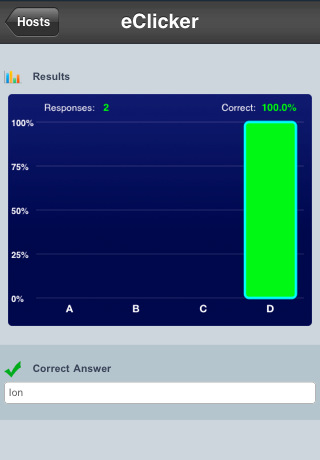
It worked really well. There was a few ipod touches that lagged a little bit (the question didn't show up right away). The students loved it though and were very engaged. They loved the immediate feedback as it told them after each question whether they got it right or not and much like American Idol, showed a nice colourful bar graph on what everyone else picked. There is a website where you can log on and create the questions that way. We found it a bit buggy but overall it was much faster than designing the questions on the ipod touches. Overall, an excellent investment for $10!

How do we plan to use it in the future?
We thought we could differentiate the questions and have 2 different sets of questions at the same time. So we would have 2 hosts of questions, easier and challenge questions. We also thought it would be great to have the students design their own questions and test each other
on concepts!


Monday, November 15, 2010

Evernote-A gateway to collaboration


One of the main goals we've had with this iPod Touch pilot program is to try and ensure that the ipod touches are being used in the most effective ways possible. It is quite easy to fall into the trap of having the students play Math apps in a Maths center. However, if they were only doing this on computers, I would question whether computers were being used in the best way possible. Let me elaborate. Having students do low level thinking tasks in any situation, isn't always the best use of learning time. Glancing at Bloom's Taxonomy of Learning Domains, remembering and understanding are at the bottom of the totem pole so to speak. While creating is a much complex learning behavior, that is not to say that some knowledge isn't important but through creating, you are forced as a learner to apply what you know to new situations. If you don't know anything, it's hard to do that ;)

So applying this model to technology and learning, it doesn't take a rocket scientist to figure out that having students create work is a much more meaningful use of their time. Thus, we have been striving to find apps that allow for more creation rather than remembering.

Evernote is just one of those apps. Grade 3 students have been using it to complete reading responses on books from their literature circles. We wanted students to be able to easily read other reading responses on "notes" that they created and respond to them. Much like a blog or Google Doc to create a shared discussion. Finally, after hours of persevering, we figured out that notebooks on Evernote are actually like folders. We created a new notebook for each student and ensured that they tagged their posts with their name. Students could immediately search for those notebooks and tags, read what they wrote and respond to it. A perfect way to collaborate on their learning! Here is an example of what they came up with:


While the challenge is to make it easier to see who wrote what, we will use color codes in the future to make this easier. Within 2 clicks, students could quickly read each other's reading responses. It was simple for the teacher to manage these posts because they came up immediately on his laptop computer.

We are now going to explore using voice notes as a way to differentiate these tasks.


Wednesday, November 3, 2010

Going deeper into learning


After a busy couple of weeks managing the logistics of putting the ipod touches into place including synching, downloading audiobooks and podcasts, we are now looking at how the touches can start to improve learning in a meaningful way.
Both Mr. Cross and I were looking at ways to go beyond the simple "math games" apps. We are looking for ways to transform learning. Both of us have used technology in ways with authentic purposes and moving from using technology for simple drill and practice to creating a learning environment which students regularly engage in activities that would have been impossible without technology (or at least very difficult). There is a fabulous Technology Integration Matrix here that helps illustrate our point(see image below)


A good example of transformative learning experience using an iPod Touch app is Evernote.
Mr. Cross had a great idea of students making text and voice notes about a book they are reading. Students would then tag there posts with their name and since all students had the same Evernote account, these notes would then appear on their iPod Touch. Students could read their notes and add to what their partner put (much the same as Google Docs). All these notes could be organized on a laptop and then uploaded to his class blog. Could this have been done without this technology? Maybe. It certainly wouldn't have been as interactive nor would the teacher have a digital record of this.

So what other ideas are we working on? The Grade 3 class will be starting a unit on the Solar System so using the iMovie app, students will be making "Captain's Log" (ala Star Trek) entries into iMovie, editing them and publishing them. Alas, I cannot take credit for this idea...this was all Mr. Cross!